


CineToolkit:Caster&Roku Remote
3.62.88K Reviews
App Specs
- Version
- 2.4.1
- Updated On
- License
- Free
- Downloads
- 1,000,000+
- Developer
- Cinetoolkit
- Categories
- Tools
- Platform
- Android
Screenshots

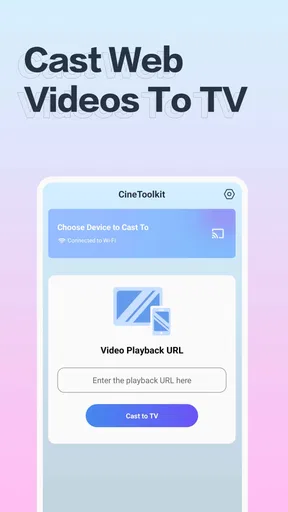
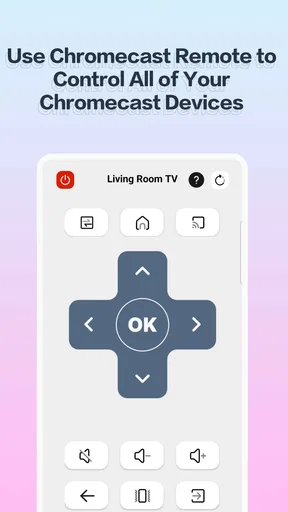
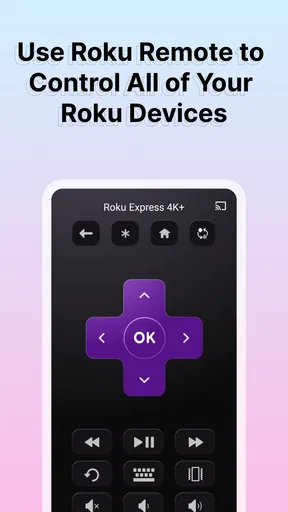
 Analysis by AppCompare
I’d approach CineToolkit:Caster&Roku Remote as a possible extra control option for a Roku household, not as a guaranteed replacement for every remote or a universal streaming hub. It is a free tools app from Cinetoolkit, and its central appeal is practical: bring phone-based control and casting into the same place. That combination could be handy when the physical remote is missing or when you want to put something already on your phone onto the TV.
For a first-time user, the best way to judge it is to start with one simple task rather than expecting every streaming need to be solved at once. Install it, check that your phone and Roku are on the same home Wi-Fi, and try connecting before you settle in for a show. If the device appears and responds, you have reached the useful milestone: your phone can act as a backup control. After that, test casting separately, since controlling a Roku and sending personal media from a phone are different jobs.
Who is likely to get the most from it
I can see the app suiting someone who already uses a Roku and sometimes wants a second way to control it. It is especially worth considering if the remote tends to migrate between rooms, if several people share the TV, or if you often want to show a phone video to someone on a larger screen. In those situations, having a phone option can save a small but irritating interruption.
A realistic example is getting home with a short clip you want to share over dinner. Rather than passing the phone around, you can try casting it to the TV, then use the remote controls on the phone if you need to navigate. That workflow makes the app more useful than a remote-only utility, provided your Roku and phone cooperate on the network and the media format works with the casting route.
It is less compelling if you do not own or use a Roku, or if your main goal is to manage every television and streaming service from one place. The name may sound broad, but the reliable expectation should be narrower: Roku-oriented controls plus casting tools, not a replacement for each platform’s own app or account. If a physical remote is already comfortable and always nearby, you may not gain enough to keep another utility on your phone.
What the first connection is really testing
Before deciding that a connection problem means the app is broken, check the basics that commonly trip up phone-to-TV control. The phone and Roku generally need to be reachable on the same local network; being connected to the same internet account is not always the same thing as being on the same Wi-Fi network. Guest networks, separate Wi-Fi bands configured with isolation, or a router setting that keeps devices apart can prevent discovery even when both screens show a connection.
If the Roku does not appear, I would first confirm that both devices are on the intended home network, then reopen the app and try again. It is also worth checking whether the Roku is awake and responsive with its normal remote. This is a more useful diagnostic than repeatedly tapping through the phone app: if the TV itself is offline or frozen, a second controller cannot fix the underlying issue. On shared or managed networks, device discovery may be restricted, in which case the ordinary physical remote is the sensible fallback.
Worth Reading Before You Choose

EA SPORTS FC Mobile 26 Is a Bigger Football Game, but It Takes Time

Flipboard Shows What News Apps Must Do Beyond the Feed

Switching to Android Auto Means Rethinking Your Driving Routine

Google Calendar Makes a Crowded Week Easier to Manage

Ludo King Makes the Most of the Minutes Between Plans

Baby Panda World Brings Quick Play to Modern Phones, but Its Game Library Feels Busy
Once connected, test a basic navigation action before relying on the app for a search or a long viewing session. A quick test tells you whether the connection is stable enough for everyday use and helps separate control issues from casting issues. If navigation works but a particular video does not cast, that points to a different limitation than a missing Roku connection.
How it differs from the usual alternatives
The built-in Roku remote remains the straightforward choice for dependable, tactile control, especially when you want physical buttons without unlocking a phone. A manufacturer’s own mobile app may also be a better fit if you want a familiar, platform-specific control experience. CineToolkit’s appeal is that it brings Roku remote use together with casting, so it may reduce the need to switch between separate tools for those two tasks.
That convenience has a trade-off: a phone-based remote depends on your phone being available, charged, and connected to the right network. It can also be less immediate than reaching for a dedicated remote when the phone is locked or being used for something else. I would keep the physical remote accessible until I had tested the app in my home, rather than treating the phone as the only way to control the TV.
Casting also deserves a separate check. A video stored on a phone, a streaming service’s own cast button, and a Roku channel are not interchangeable routes. If a service works best through its own app or directly on Roku, use that route rather than assuming this utility will make every piece of content available on the TV. For personal clips, photos, or music, the app’s casting role is the more natural place to start.
Getting Started with CineToolkit
First things first, downloading the app is a breeze. Available on both Android and iOS, you just head to your app store, hit download, and you’re good to go. Once installed, the setup is straightforward. The app seamlessly connects to your Roku device over Wi-Fi. No more fumbling with those tiny remote buttons or changing batteries at the worst possible moment.
Features That Make Life Easier
One of the standout features of the CineToolkit:Caster&Roku Remote is its intuitive interface. It feels like the app designers really thought about what users want. The layout is clean and user-friendly, which means you won't need a degree in rocket science to navigate it.
Now, let's talk about casting. The app allows you to cast photos, videos, and even music directly from your phone to your TV. It’s like having a personal cinema at your fingertips. I tried casting a few vacation videos, and it was as easy as pie. The quality was top-notch, no lags or buffering, just smooth streaming bliss.
Control at Your Fingertips
Forget about losing your remote ever again. With this app, your smartphone transforms into a fully functional remote control. You can adjust volume, switch channels, or even search for your favorite shows using voice commands. It's like having a little assistant ready to cater to your every streaming whim.
I particularly loved the voice search feature. You can just say the name of a show or movie, and boom, it pops up on the screen. It’s perfect for those moments when you can't quite remember which channel your favorite show is on. Just say it, and let the app do the heavy lifting.
Seamless Integration
Another cool thing is how well this app integrates with other streaming services. Whether you’re a Netflix fanatic, a Hulu buff, or an Amazon Prime aficionado, the app has you covered. It brings all your streaming platforms into one place, making it super convenient to switch between them without any fuss.
The app also updates in real-time, so you’ll always have access to the latest shows and movies. Plus, the personalized recommendations are a nice touch, helping you discover new content based on your viewing habits. It’s like having a personal movie critic in your pocket.
Checking the fit before you commit
There are a few practical questions I would settle before making this my regular setup. First, does it work with the particular Roku you use? The sensible test is to install it while you still have the regular remote, connect on your home network, and try navigation. That way, a mismatch or network hurdle does not leave you unable to use the TV.
Second, should you expect to cast everything from your phone? I would not. Casting is useful for compatible photos, videos, and music, but it is not the same as mirroring every app or bypassing a service’s own playback rules. When a streaming service already has a Roku channel or its own casting flow, that option may be more dependable. Treat personal media as the first casting test, rather than using a subscription show as the only measure of whether the app works.
Third, is the app completely free in practice? It is free to install, while in-app purchases are offered, with listed items ranging from $0.99 to $49.99. I would check the purchase screen carefully and decide whether any paid option actually solves a need you have before buying. The basic idea is easy to evaluate without assuming that every tool or benefit is included at no cost.
The app is rated Teen, so I would also consider that if the phone is shared with younger family members. That label is a useful cue to review the app experience and any purchase prompts together, rather than handing over a device and assuming it is only a simple remote. For a household account, keeping the phone’s purchase protections in place is a sensible precaution.
A small routine that avoids most frustration
My preferred way to use a phone remote is as a backup with a specific job. Before guests arrive, I would connect once and check that navigation responds; then I would leave the physical remote where it can be found. If someone wants to share a clip, I would open the media on the phone and test casting before everyone gathers around the screen. This avoids turning a casual moment into a troubleshooting session.
It also helps to distinguish the app’s different roles. Use the remote side when you need to move around Roku, and use casting when the content starts on the phone. If one part fails, test the other independently instead of concluding that the whole app is unusable. That simple separation makes it easier to identify whether the issue is the home network, the Roku, or a particular media source.
The choice between this and another option comes down to what is most annoying in your routine. If losing the remote is the problem and you like using your phone, a mobile controller makes sense. If you primarily want hands-on buttons, the physical remote remains better. If you mostly watch content inside one streaming service, its own Roku app or official casting controls may be more direct than adding a separate tool.
How I would judge it after a week
I would not judge the app by how many controls it appears to offer on the first screen. I would judge it by whether it reliably reconnects in the room where I actually watch TV, whether the controls respond without repeated attempts, and whether casting saves time for the media I commonly share. Those are the moments that determine whether a utility stays installed or becomes one more icon I forget about.
It is also worth thinking about the phone’s role in a shared living room. A phone remote is convenient when it is already in your hand, but awkward when someone else has it or when you do not want to unlock and pass around your personal device. A household that takes turns controlling the TV may still prefer a dedicated remote as the default, with the app available for the person who wants to cast or needs a temporary backup.
What the numbers and updates mean to me
CineToolkit has a 3.6 average from around 9,300 ratings, alongside roughly 2,800 written reviews, and it has passed a million installs. I take that as a sign that many people have tried it, but the middling average is a reason to test it in your own setup rather than assume a flawless connection. Remote utilities are especially sensitive to differences in home networks and device configurations, so someone else’s result may not predict yours.
The app launched on February 17, 2023, and its current version is 2.3.0. It supports Android 5.0 and later, which makes it accessible to a range of Android devices, though a supported operating system alone cannot guarantee that every phone and Roku will behave identically. I would keep expectations practical: test the exact combination you plan to use, and keep the standard Roku remote nearby until the app has earned your trust.
Who should pass, and who should try it
I would skip it if you do not have a Roku, if your home network blocks devices from finding one another, or if you want a single app to replace every TV and every streaming service’s controls. It is also not the best answer for someone who dislikes using a phone while watching or needs physical buttons that are ready without unlocking a screen. In those cases, the usual remote or the relevant service’s own app is a cleaner fit.
I would try it if a Roku is already part of your routine and you want a convenient backup, or if sharing phone media on the TV is a regular small pleasure. The strongest reason to install it is not an abstract promise of smarter streaming; it is a concrete inconvenience you can check quickly. If it connects and handles that task in your home, it may earn a place on your phone. If it does not, you can return to the familiar remote without rebuilding your setup.
Final Thoughts
All in all, the CineToolkit:Caster&Roku Remote app made my streaming experience a whole lot smoother and more enjoyable. It’s packed with features that make managing your entertainment easy and fun. Whether you're a tech-savvy streamer or just someone who wants a more convenient way to control their TV, this app is worth checking out.
So, if you’re tired of digging through couch cushions for your remote or just want a more seamless viewing experience, give this app a try. It’s like having a VIP pass to the world of streaming, right in your pocket. Happy streaming!
Pros
- Easy setup with intuitive interface.
- Seamless casting to multiple devices.
- Supports a wide range of media formats.
- Responsive and user-friendly remote control.
- Regular updates with new features.
Cons
- Occasional lag in remote functionality.
- Limited support for older Roku models.
- Ads can be intrusive at times.
- Requires stable Wi-Fi for optimal use.
- Some features behind a paywall.
FAQs for CineToolkit:Caster&Roku Remote
What is CineToolkit:Caster&Roku Remote and what does it do?
CineToolkit:Caster&Roku Remote is a versatile application designed to enhance your streaming experience. It allows users to cast videos, photos, and music from their mobile devices directly to a Roku device. Additionally, it functions as a remote control, providing an all-in-one solution for managing your entertainment seamlessly.
Is CineToolkit compatible with all Roku devices?
CineToolkit is compatible with most Roku devices, including Roku TVs and streaming sticks. However, it's crucial to ensure your device is running the latest firmware for optimal performance. Compatibility might vary with very old models, so checking the app’s official compatibility list is recommended before downloading.
How easy is it to set up and use CineToolkit:Caster&Roku Remote?
Setting up CineToolkit is straightforward. Once downloaded, the app guides you through connecting to your Roku device via Wi-Fi. The user interface is intuitive, designed for quick navigation, making it easy even for non-tech-savvy users to cast media and use the remote control features effectively.
Are there any in-app purchases or subscriptions required?
CineToolkit offers a free version with basic features. However, for a more enhanced experience, including ad-free use and additional casting options, in-app purchases or a subscription may be required. Reviewing the pricing details within the app will help you decide if the upgrades meet your needs.
What are the privacy and security features of CineToolkit?
CineToolkit prioritizes user privacy and security. The app requires access to your media files for casting purposes, but it does not store or share your data. Regular updates ensure security measures are up-to-date. Always download from official app stores to avoid counterfeit versions that could compromise security.


